
Reimagine Work with an Intelligent Digital Workspace
Unify collaboration, automate processes, and enhance decision-making using SharePoint Online, Microsoft 365, and integrated AI capabilities.
Why Digital Workspace?
In many organizations, employees work across disconnected systems—email, SharePoint, Teams, business applications—leading to fragmented information, inefficiencies, and slower decision-making.
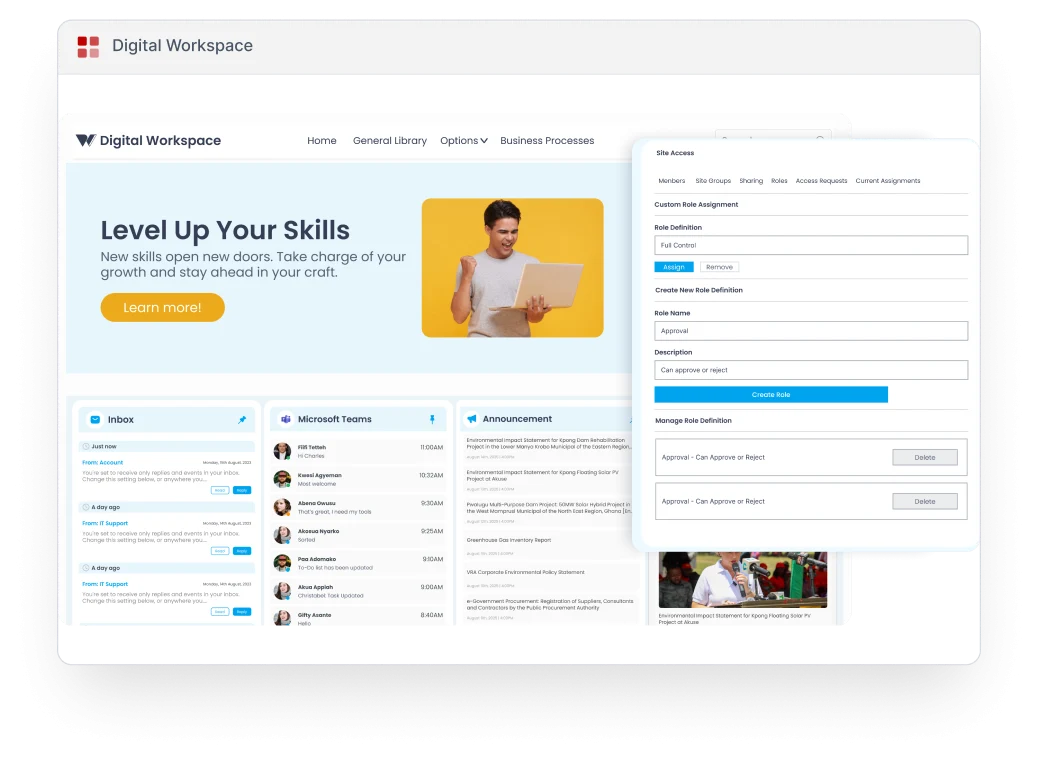
Digital Workspace addresses this by bringing together tools, applications, and data into a single, secure, and centralized environment built on SharePoint Online. It enables organizations to digitize processes, streamline workflows, and improve collaboration at scale.
Digital Workspace addresses this by bringing together tools, applications, and data into a single, secure, and centralized environment built on SharePoint Online. It enables organizations to digitize processes, streamline workflows, and improve collaboration at scale.

Centralized Command Center
All your M365 apps, third-party tools, and enterprise data unified into one
drag-and-drop dashboard.

AI-First Architecture
Natural language search, intelligent recommendations, and predictive
analytics embedded at every touchpoint.

Role-Based Personalization
Every employee sees a workspace tailored to their role, department, and
daily priorities—automatically.
How Digital Workspace
Delivers Tangible Value
Digital Workspace combines collaboration, automation, AI, and data insights into a unified platform that transforms how work gets done.

Centralize Access to Tools and Information
Digital Workspace provides a single access point for employees to:
- Access documents, applications, dashboards, and announcements
- Reduce system switching across multiple platforms
- Work from a unified and consistent environment
This eliminates fragmented workflows and improves productivity across teams.

Enable Flexible and Hybrid Work
The platform supports modern work environments by:
- Allowing access from any device and location
- Supporting remote and hybrid collaboration
- Delivering a seamless experience across user environments
This ensures continuity and productivity regardless of where employees are working.

Embed AI for Intelligent Work Experiences
AI transforms the workspace into an intelligent system by enabling:
- Natural language search and query understanding
- Automated document retrieval and summarization
- Personalized and continuously improving results
Employees can simply ask questions like:
“Show me the latest report”
“Summarize this document”
This significantly reduces time spent searching and enhances productivity.
“Show me the latest report”
“Summarize this document”
This significantly reduces time spent searching and enhances productivity.

Automate Search, Discovery, and Knowledge Access
Digital Workspace uses AI to:
- Index documents across SharePoint libraries
- Understand user intent and context
- Rank results based on relevance and user behavior
This creates a smart knowledge system where information is always easy to find.

Deliver Real-Time Insights with Power BI Integration
Integrated analytics capabilities allow organizations to:
- Consolidate data from ERP, CRM, and business systems
- Access real-time dashboards and performance metrics
- Enable role-based data visibility across teams
This empowers leadership and teams to make faster, data-driven decisions.

Integrate Line of Business Applications in One Workspace
Digital Workspace connects business systems into a single experience:
- Access CRM, ERP, HR systems, and operational tools
- Use Single Sign-On (SSO) for seamless access
- Perform tasks without switching platforms
- Maintain real-time synchronization across systems
This simplifies workflows and improves operational efficiency.

Enhance Productivity with Microsoft 365 and AI
Users can work directly within the workspace by:
- Accessing Word, Excel, Outlook, and Teams
- Generating documents and email responses with AI
- Summarizing content and accelerating communication
- Collaborating in real time without leaving the platform
This reduces manual effort and accelerates everyday tasks.

Enable Personalization and Role-Based Experiences
Digital Workspace adapts to individual user needs by:
- Allowing workspace customization based on roles
- Supporting personalized layouts and dashboards
- Providing AI-driven recommendations based on usage
Each employee can tailor their workspace to match their workflow.

Simplify Adoption with Drag-and-Drop Customization
The platform provides a user-friendly interface that allows:
- Easy arrangement of workspace components
- No-code customization through drag-and-drop functionality
- Rapid adoption without technical expertise
This ensures usability across both technical and non-technical users.

Ensure Secure Access and Governance
Digital Workspace supports enterprise security by:
- Enforcing secure access to data and applications
- Supporting role-based permissions
- Incorporating security controls and monitoring
This ensures that the right users access the right information securely.
Solution Architecture
Digital Workspace is built on scalable Microsoft technologies:

What You Can Do with Digital Workspace
Digital Workspace enables organizations to:
- Centralize tools, documents, and business applications
- Automate workflows and reduce manual processes
- Access and analyze data in real time
- Use AI to retrieve, summarize, and generate content
- Personalize work environments for different roles
- Streamline collaboration across teams and departments
Driving Measurable Impact
By unifying tools, data, and intelligence into a single platform, Digital Workspace helps organizations:
- Reduce time lost switching between systems
- Improve employee productivity and efficiency
- Enhance decision-making with real-time insights
- Accelerate process digitization and automation
- Strengthen collaboration and user experience
- Enable secure and scalable adoption of AI across operations

Build a Smarter, AI-Powered Workplace
See how our intelligent platform improves productivity,
centralizes your tools, and delivers actionable insights for
your enterprise—in a personalized 30-minute demo.
- Personalized walkthrough tailored to your industry
- Live demonstration with real-world enterprise use cases
- Expert consultation on M365 integration
- No commitment. No credit card required